|
Delays the processing of a task.
Sintaxe
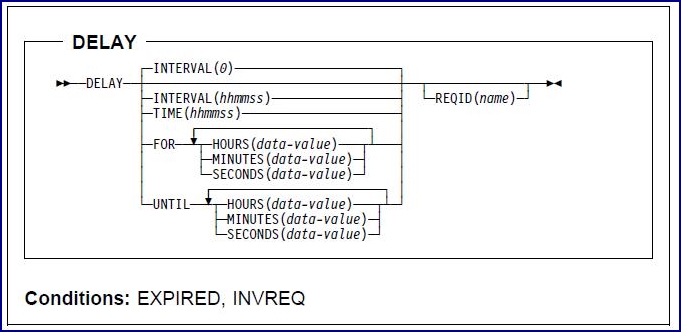
Condições: EXPIRED, INVREQ
- Nota:
- INTERVAL and TIME are not supported for C or C++ programs.
Descrição:
DELAY suspends the processing of the issuing task for a specified interval of time or until a specified time of day.
The following example shows how to suspend the processing of a task for five minutes, using the INTERVAL option:
    EXEC CICS
         DELAY
         INTERVAL(500)
         REQID('GXLBZQMR')
    END-EXEC
The following example shows how to suspend the processing of a task until 12:45 p.m., using the TIME option:
    EXEC CICS
         DELAY
         TIME(124500)
         REQID('UNIQCODE')
    END-EXEC
The INTERVAL and TIME options are not supported for C or C++ programs, which should use the corresponding FOR and UNTIL options instead.
Two ways are possible to enter the interval or time value, using the FOR and UNTIL options:
- A combination of at least two of HOURS(0 through 99), MINUTES(0 through 59), and SECONDS(0 through 59). For example, HOURS(1) SECONDS(3) means
one hour and three seconds (the minutes default to zero).
- As one of HOURS(0 through 99), MINUTES(0 through 5999), or SECONDS(0 through 359999). For example, HOURS(1) means one hour; MINUTES(62)
means one hour and two minutes; and SECONDS(3723) means one hour, two minutes, and three seconds.
The C or C++ program equivalent of the INTERVAL example follows:
    EXEC CICS
         DELAY
         FOR MINUTES(5)
         REQID('GXLBZQMR')
    END-EXEC
The C or C++ program equivalent of the TIME example follows:
    EXEC CICS
         DELAY
         UNTIL HOURS(12) MINUTES(45)
         REQID('UNIQCODE')
    END-EXEC
More information about the use of time fields in C or C++ programs is given in the TXSeries for Multiplatforms
Application Programming Guide.
For more information about the use of time fields in COBOL programs, see Replacing
arguments when programming with COBOL.
Opções
FOR
- Specifies the interval of time for which the task processing is to be suspended, together with one or more of the
HOURS, MINUTES, and SECONDS options.
- This option must be used instead of INTERVAL in C or C++ programs. FOR HOURS(0) is the default.
HOURS(data-value)
- Specifies, as a 32-bit binary value, the number of hours for use in conjunction with FOR or UNTIL.
- The value must be in the range 0 through 99.
INTERVAL(hhmmss)
- This option is for COBOL only.
- The option specifies the interval of time that is to elapse from the time at which the DELAY command is issued until
processing is resumed.
- The specified interval is added to the current clock time by CICS to calculate the time when processing is to resume.
- INTERVAL(0) is the default. The maximum permitted INTERVAL value is 995959.
- The INTERVAL option is not supported for C or C++ programs, which use the corresponding FOR option instead.
MINUTES(data-value)
- Specifies, as a 32-bit binary value, the number of minutes for use in conjunction with FOR or UNTIL.
- The value must be in the range 0 through 59
- If HOURS or SECONDS is also specified, or in the range 0 through 5999 otherwise.
REQID(name)
- Specifies a name that uniquely identifies the DELAY command.
- The name can be up to eight characters long.
- This option can be used when another task is to be provided with the capability of canceling an unexpired DELAY command.
SECONDS(data-value)
- Specifies, as a 32-bit binary value, the number of seconds for use in conjunction with FOR or UNTIL.
- The value must be in the range 0 through 59 if HOURS or MINUTES is also specified, or in the range 0 through 359999
otherwise.
TIME(hhmmss)
- This option is for COBOL only.
- The option specifies the time when the task resumes processing.<
- See the TXSeries for Multiplatforms Application Programming Guide.
- The TIME option is not supported for C or C++ programs, which use the corresponding UNTIL option instead.
UNTIL
- Together with one or more of the HOURS, MINUTES, and SECONDS options, specifies the time when the task should resume
processing.
- This option must be used instead of TIME in C or C++ programs.
Condições
EXPIRED
- Occurs if the specified time has already expired when the command is issued.
- Ação pré-definida: Ignores the condition.
INVREQ
- Occurs for the following conditions, depending on the options that are specified on the DELAY command:
- Hours are out of range.
- Minutes are out of range.
- Seconds are out of range.
- The DELAY command specifies a REQID name that already exists.
- Ação pré-definida: Terminates the task abnormally.
Informações relacionadas:
© Copyright IBM Corp.
|