|
So far we have focused on COBOL as a language with which to write CICS applications, however as you should know, COBOL isn't the only language that CICS supports
and that an application can be formed from a set of programs written in different languages.
This polyglot capability is paramount in allowing developers to take applications written in COBOL, create new Java components or even re-write elements in Java
and then host them back in CICS.
The new Java component can still access the CICS API and also call existing COBOL programs using a native interface.
6.1 Why use Java with CICS?
We've seen how breaking apart the presentation from the business logic of an existing application really provides the key to modernizing an application.
This is still true when looking at using Java as part of your application modernization.
If the core of your application has a well defined interface then it's easy to consider writing new applications that can use that application or re-writing in in
Java.
If the interface uses a well structured channels and container interface then this is even better.
But why replace or extend applications with Java?
What benefits can there be for your organization?
Well for one it's probably easier to find Java application programmers than it is
COBOL programmers, meaning there is a larger skill pool that you can draw from to access new developers.
There is also a wider range of both protocol and framework support in Java than there is for other languages like C or COBOL.
You can interact with JSON objects or service a HTTP GET request in COBOL, but it's probably easier in Java.
Java also runs really well on the mainframe, and if you have a specialty engine like a zIIP processor in your Z hardware then the majority of your Java code can
run on that rather than on your general purpose engine, meaning that it will not affect your monthly license charge.
Finally, the best reason for using Java to write CICS applications is that there is a tonne of support in CICS for Java.
6.2 Writing CICS Java applications
If you are writing Java then you probably already have an IDE (Integrated Development Environment) of choice, such as Eclipse, IntelliJ, or Visual Studio.
You also possibly use Maven or Gradle as a build toolkit for your Java projects, and if so, CICS provides its Java API as a maven or gradle dependency making it
easy to use your existing development environment to write Java in CICS.
If you aren't able to use Maven or Gradle, you can use the IBM CICS SDK for Java, to access the JCICS API instead, but we will focus on the Maven and Gradle options.
So what types of applications could you write?
If you are writing a general purpose audit logging component or creating a new API based in Java to extend your existing applications, there is support in CICS to
help you, from supporting plain old java objects or POJOs through to running full J2EE applications or springboot applications.
CICS embeds both a JVMServer and a WebSphere® Liberty application processor to allow you to run your Java applications.
A JVM is a Java Virtual Machine, and because this JVM runs within the CICS application server, CICS ensures that your Java application runs with the same
transactional, security and performance concerns as the rest of the application running in CICS.
CICS also supplies the APIs to the Java application to allow it to call both native CICS APIs and link to other programs.
6.2.1 Hello World code sample
Let's take a look at the hello world program again and move it to use Java running in CICS (Example 6-1).

See, it's not that much more complicated than a standard hello world example in Java.
In fact the only thing we need to do is use the Task object to integrate with the CICS terminal.
Although this is the simplest bit of code you could write, it's really not much use.
Who wants to be writing to a terminal in Java? Let us move to something a bit more interesting.
6.2.2 Moving the Payroll application to Java
In previous chapters we've looked at a basic application that allows basic updates to be made against records in a file. Currently this application uses a 3270
interface.
We can take that application and modernize it to use Java.
Let's expose the PAYBUS1 application as a simple GET API call within Java.
As well as simply exposing the program as an API let's extend the application by writing a simple audit logging application to log the requests that we have
received (Figure 6-1)

Within CICS, the resources that we already have, are our PAYBUS program and a FILE DEFINITION for the file PAYROLL, we will now extend this to also include a
JVMServer definition.
This will create a JVM inside our CICS region.
Within the JVM we will define an instance of the WebSphere Liberty Profile that we will run our Java code inside.
Within the Liberty JVM we will create a simple JAX-RS servlet that will respond to HTTP GET calls and respond with JSON.
Once we have received a request we will use the channel and container CICS API to deliver a request to PAYBUS1 and ask CICS to run that program.
Once completed we will again use the channel and container API to retrieve the response from PAYBUS1, convert it to JSON and send the response back to the user.
Once we have created that we will extend the application a little more and create a method within our servlet to perform some logging against a TDQ in CICS.
Each time a request is made, we will write the data to this auditable log.
Now we already know that PAYBUS has been modernized to use channels and containers in a previous module, it needs a single container that contains the function
that we want to use, in this case DISP followed by the employee number in order to retrieve the employee details.
So in order to achieve this, we need to use the CICS API for Java called JCICSX to perform a CICS LINK to the program PAYBUS1 passing it a channel within which our
container has been created.
Let's look at the code (Example 6-2).

First we ask the CICS task to create an object that allows use to link to a CICS program with a channel using the aptly named method create program linker with
Channel and pass it the name of the program and the channel that we wish to use. We can then call setStringInput to create a new container and put our line of
String data into that container.
At this point we have set up all the input data into the correct containers for PAYBUS1.
We then call the method link, this API requests that CICS now starts to run our PAYBUS1 program, passing it the channel and container.
This is a blocking method call and will not return until PAYBUS has finished processing, Once control returns to our Java program we need to retrieve our response
from PAYBUS1.
This will be in the same container as the input data, so we just call get output char container to retrieve the container from the channel and finally a simple
call of the get method retrieves our response data as a string.
That is a long line of code, but if you consider it, an immensely valuable and powerful line of code.
We have run a COBOL program from within a Java program, that is quite the computer science feat.
We've not really had to worry about any data manipulation, byte alignment, COBOL runtime environments or anything like that.
The CICS API has protected us from that complexity and instead allowed us to easily achieve our goal.
But we are not 'quite' done yet, we wanted to interact with a TDQ to do some logging of data.
Instead of calling an existing CICS program to write the data for us, we are going to use the CICS API to write the data directly to a transient data queue so that
it can be offloaded to a file for archiving. Let's have a look at the code we need to use (Example 6-3).

This is more straightforward than the previous example.
We create an instance of the TDQ object, we set the name of the TDQ that we want to interact with, and then simply call the writeString method passing it the
string that we want to have written.
And that's all there is to it, CICS handles the codepage conversion that is necessary, locates the TDQ and performs the write for us.
The TDQ could even exist on a different CICS region and CICS would still have handled it.
One quick thing to note, if you look at other Java and CICS examples you might notice that they don't use the same objects and methods as the example here.
That's because they are probably using the old CICS API called JCICS and this example uses JCICSX, both APIs can be used within CICS and both are available as
artefacts within Maven Central.
6.3 Unit testing Java applications
We are going to go out on a limb here and guess that if you are thinking of writing Java in CICS then you probably have some experience of writing Java on some
other platform, maybe you've written a Java component for a web application or even just a basic Java application to run on your laptop.
If you have then you probably wrote a few lines of code, tested it, probably found a bug, fixed it rinsed and repeat.
Sound familiar? So you probably want to do the same with the Java code we wrote in the previous example.
6.3.1 Writing a basic unit test
The first thing we would want to do is write some unit tests for our Java code.
If the concept of unit testing is new to you, then to quickly explain.
Unit tests are automated tests that are stored alongside the programs that they test.
Now a good unit test should only test the target program and not rely on any other programs or external services.
Let's take our servlet from the previous section as an example.
We would want to write a unit test that called this module with a customer number as a string and returned an instance of the EmployeeData object that
contained the correct data.
Let's have a look at that unit test (Example 6-4).
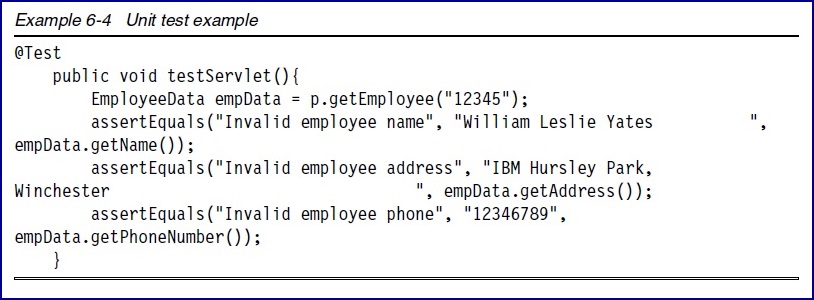
What happens when we run this test? Well it fails, with a RuntimeException when it tried to call getEmployee.
We shouldn't be surprised, as soon as our servlet attempted to use the CICS API it failed as there isn't a CICS system to run those API calls against.
We can solve this by looking at two new technologies, mocking and remoteing, both key features of the new JCICSX API.
Both of these technologies allow you to run and test your Java code locally on your workstation. But for our unit test we will just look at mocking.
6.3.2 Mocking with CICS applications
In mocking we can programmatically replace the objects in the CICS API, with mock objects that return just the data we have prepared.
We can create these mocks in the setup method of the test annotated with @Before. See Example 6-5.


Mockito is a well understood Java based framework for creating mocks for use in a JUnit test, although other mocking libraries exist.
Here we can create mocks of all the CICS API classes that our Payroll Servlet uses and define the data that should be returned when methods on those classes are
called.
This means that when our test runs, the mock objects will be used instead of the real objects in the JCICSX API.
This in turn allows our unit test to only exercise the Java code we have written and stub out the rest of the CICS application.
This means we can develop new methods within our Java class and get fast feedback from our Junit tests each time we build our project.
In this example we have just mocked out a simple call to a CICS program with a channel and container interface, but any class within the JCICSX API can be mocked.
Mocking and unit tests are a really as good way of ensuring that the Java code that we have written works as we had planned.
However if you look at that setup method again - you will see that the data that we used when mocking the get method of the readable char container was hardcoded
into the test itself.
But how would we get hold of that data in the first place so that we can use it within our test class?
6.3.3 JCICSX remoting
The answer lies in the JCICSX remoteing capability.
To describe this let's revisit the Servlet we wrote in the last module and have just written the Junit tests for.
As you can can see in Figure 6-2 on page 53 the Servlet is running in a J2EE application server on a local laptop.
It uses the JCICSX API to link to the program PAYBUS1 with a channel.

We've shown how we can use mocking libraries to mock this calls from a servlet with mocked objects to stub out the communications with CICS.
However we can configure the J2EE application server on the local machine to use a remoting capability (Figure 6-3).
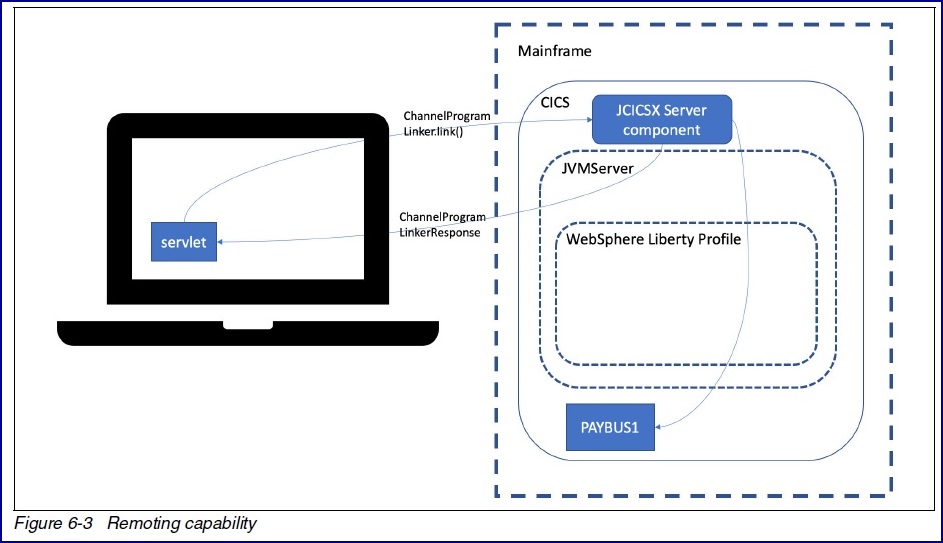
Now when the servlet accesses the JCICSX API, the API invisibly turns those calls into HTTP calls which it sends to a real CICS system.
Within CICS a JCICSX server acts as an endpoint for the API and executes the CICS request within the local machine (Figure 6-4).

It must be noted that the remoting capability is really only for test and development and is not designed as a generic connector for Java applications to connect
to CICS.
Now what happens when we are ready to run our application for real inside, well we just deploy the servlet from our local application server into CICS.
When our servlet now runs, the JCICSX API is aware that we are running inside of CICS.
Now we are running inside of CICS when our servlet uses the JCICSX API instead of using the remote connection, the API switches out the remote connection and
replaces it with the standard cross memory calls directly into CICS.
In this section we've shown how writing a Java application for CICS is really just the same as writing a Java application for anywhere else.
You can build it locally, test it locally and also connect it to CICS to test the integration of your Java code with the rest of your CICS services.
This document was created or updated on December 17, 2020.
© Copyright IBM Corp.
|